239.58
EUR / EA
239.58
EUR
239.58 €
excl. VAT
239.58
EUR / EA
excl. VAT
Not Available For Sale
This combination does not exist.
Up to 4 EA ready to ship on Thursday 2026-08-06
Order before 16:00 CET on Tuesday 2026-08-04
Up to 8 EA ready to ship on Monday 2026-08-10
Order before 16:00 CET on Tuesday 2026-08-04
35 EA available on request, fees apply
Special order from vendor stock.
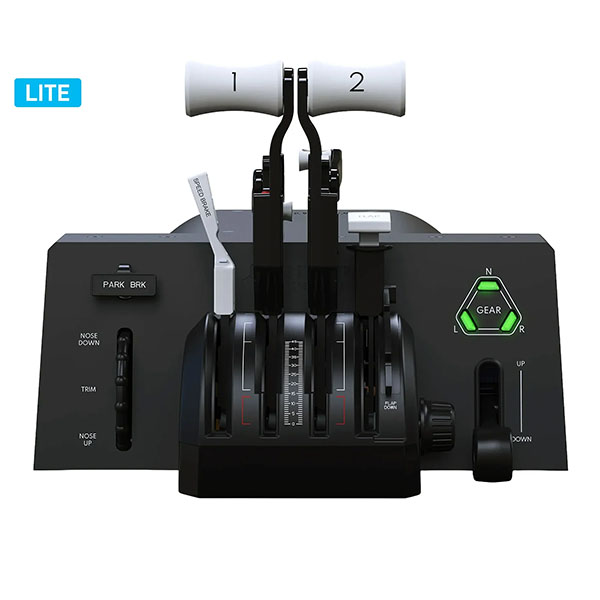
The Honeycomb Bravo Throttle Quadrant Lite is a compact flight-simulator throttle control designed to provide essential, tactile cockpit-style inputs for PC and Mac simulation setups. Its streamlined layout combines four interchangeable throttle levers with adjustable tension, a low-profile pitch trim wheel, parking-brake lever and landing-gear lever with LED status indication.
Designed for straightforward simulator control during take-off, cruise, approach and landing, the Bravo Lite supports flexible lever configurations for general-aviation and commercial-style simulation. Included flap-detent inlays allow the flap-control feel to be tailored to the preferred simulator setup.
- Manufacturer model: HC003790
- Reference number: 4039621003790
- Four interchangeable levers with adjustable tension
- Integrated pitch trim wheel
- Parking-brake and landing-gear controls; landing-gear lever incorporates an LED status indicator
- USB-C to USB-A connectivity; cable included
- Compatible systems: PC and Mac
- Published simulator compatibility: Microsoft Flight Simulator, X-Plane 11 and 12, and Prepar3D
- Dimensions (L × H × W): 40 × 13 × 27 cm
Included: Bravo Throttle Quadrant Lite, interchangeable general-aviation and commercial-style throttle levers, flap-detent inlays, USB-C to USB-A cable, dual mounting solution and quick-start guide.
Documentation: Manufacturer product resources, including Microsoft Flight Simulator profiles and landing-gear LED driver downloads, are available from the Honeycomb Aeronautical product page. Official declarations of conformity are available from Honeycomb Aeronautical’s Declarations of Conformity page.